

Today, I was experimenting with running Large Language Models (LLMs) locally on a Radxa Rock 5B with the goal of creating a completely offline AI coding assistant for my ESP32 development work.
My hope was simple:
Can a small ARM-based SBC replace paid AI subscriptions and provide unlimited coding assistance for ESP32, ESP-IDF, FreeRTOS, LVGL and general programming?
This post documents everything I tested, the models I ran, the benchmarks I collected, the issues I faced, and my final conclusions.
Why I Started This Experiment
Like many developers, I recently started using AI extensively for:
- Writing code
- Debugging
- Understanding libraries
- Generating boilerplate
- Refactoring projects
- Learning new frameworks
The recurring subscription costs of:
- ChatGPT
- Claude
- Cursor
- GitHub Copilot
- Claude Code
made me wonder:
Can I run everything locally on hardware I already own?
I had a Radxa Rock 5B sitting on my desk, so it became the perfect test platform.
Hardware Used
Board
Radxa Rock 5B
Specifications:
- Rockchip RK3588
- 4x Cortex-A76 @ 2.4 GHz
- 4x Cortex-A55 @ 1.8 GHz
- Mali GPU
- 6 TOPS NPU
- 8 GB RAM
Storage
- 64 GB MicroSD Card
Operating Systems Tested
Official Radxa Images
- Debian Bullseye KDE
- Debian Bookworm KDE
Armbian
- Armbian 26.2.1 Minimal (CLI)
- Debian 13
- Vendor Kernel 6.1.115
First Problem: Armbian Would Not Boot
After downloading the latest Armbian image and flashing it to the SD card:
Armbian 26.2.1 Minimal (CLI)
Debian 13
Vendor Kernel 6.1.115
The board appeared dead.
Symptoms:
- Solid green LED
- No HDMI output
- No login screen
- No apparent activity
My first thought was:
The image is broken.
However, further testing revealed something interesting.
Discovering That Armbian Was Actually Booting
I connected Ethernet and checked my router.
Sure enough:
192.168.x.x
was assigned to the board.
SSH worked perfectly.
The board was actually booting.
The issue was:
HDMI output was not working.
This is worth mentioning because many users may assume the board is dead when it is actually running perfectly in headless mode.
Installing Ollama
Once Armbian was working, I installed Ollama.
curl -fsSL https://ollama.com/install.sh | sh
Installation completed successfully.
Verification:
ollama --version
Initially:
0.9.9
Later upgraded to:
0.30.9
Which Models Did I Test?
I wanted to compare both general-purpose and coding-focused models.
General Qwen Models
Installed:
ollama pull qwen2.5:0.5b
ollama pull qwen2.5:1.5b
ollama pull qwen2.5:3b
ollama pull qwen2.5:7b
These are general-purpose language models.
Coding Models
Installed:
ollama pull qwen2.5-coder:0.5b
ollama pull qwen2.5-coder:1.5b
ollama pull qwen2.5-coder:3b
ollama pull qwen2.5-coder:7b
The coding variants are specifically trained for:
- Programming
- Debugging
- Refactoring
- Code generation
Initial Impressions
My first test question was deliberately simple.
How many GPIO in ESP32?
The response started appearing slowly:

The ESP32 is a micro...
One word at a time.
Very slowly.
At first glance it felt like:
1-2 tokens/sec
which was disappointing.
Investigating Performance
I began troubleshooting.
RAM Check
free -h
Result:
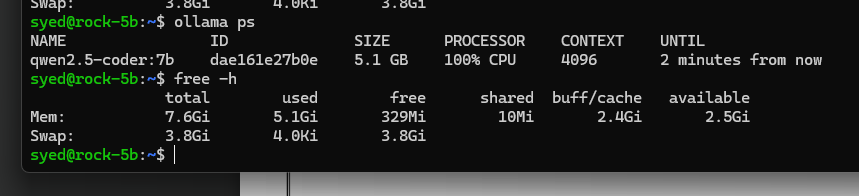
RAM: 7.6 GB
Swap: 3.8 GB
No significant swapping occurred.
Memory wasn’t the issue.
CPU Frequency Check
I checked whether the board was stuck in powersave mode.
cat /sys/devices/system/cpu/cpu4/cpufreq/scaling_cur_freq
Result:
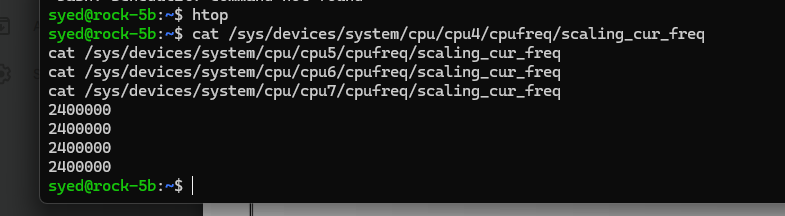
2400000
2400000
2400000
2400000
All Cortex-A76 cores were running at maximum frequency.
CPU Governor
cat /sys/devices/system/cpu/cpu4/cpufreq/scaling_governor
Result:
schedutil
Normal behavior.
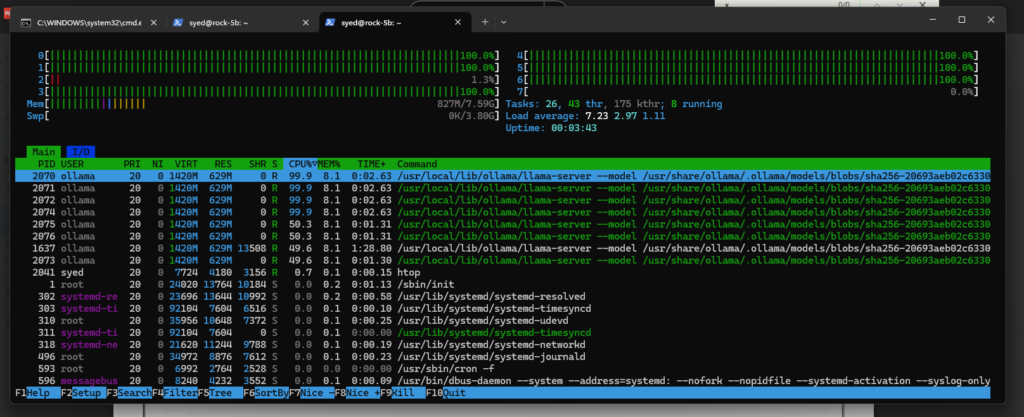
CPU Utilization
Using:
htop
I observed:
CPU0 100%
CPU1 100%
CPU2 100%

CPU4 100%
CPU5 100%
CPU6 100%
The model was fully utilizing the CPU.
Updating Ollama
Because performance felt poor, I upgraded Ollama.
curl -fsSL https://ollama.com/install.sh | sh
New version:
0.30.9
Logs confirmed:
Listening on [::]:11434
and:
Inference compute: CPU
This detail later became very important.
Measuring Real Performance
Instead of guessing, I used the Ollama API directly.
curl http://127.0.0.1:11434/api/generate \
-d '{
 "model":"qwen2.5:0.5b",
 "prompt":"Write exactly the numbers 1 to 10",
 "stream":false
}'
The returned JSON contained:
"eval_count":32
"eval_duration":8841163000
Calculating Tokens per Second
32 tokens
÷
8.84 seconds
=
3.62 tokens/sec
Actual generation speed:
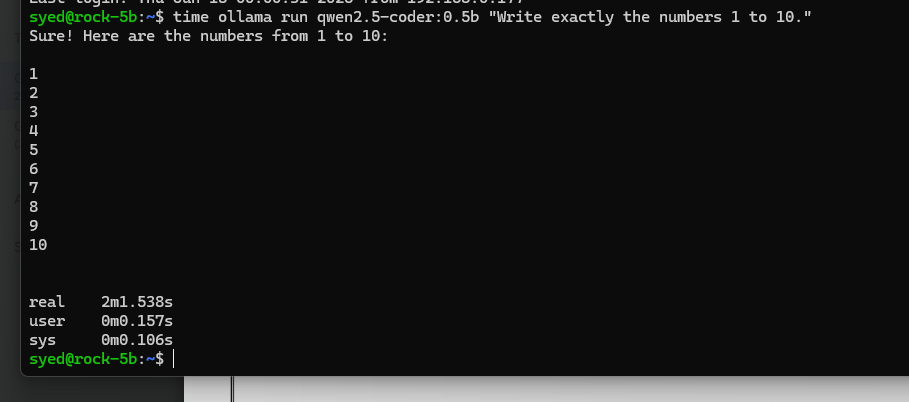
≈ 3.6 tokens/sec
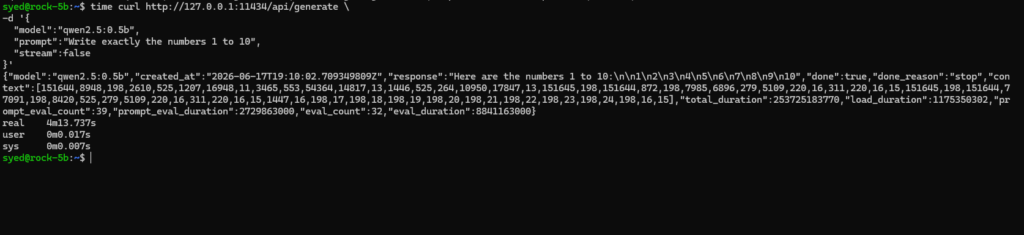
This was much better than my initial estimate.
However, it was still nowhere near the speed of cloud AI systems.
CPU Capability Verification
I verified CPU features.
lscpu
Important capabilities:
asimd
asimddp
asimdrdm
Meaning:
- NEON acceleration available
- Dot-product instructions available
- ARM optimizations available
Nothing obvious was missing.
The Important Discovery
The board wasn’t malfunctioning.
The problem was architectural.
Current inference path:
Qwen
  ↓
Ollama
  ↓
CPU
The Rock 5B’s NPU was completely unused.
Everything was running on the CPU.
What About the 6 TOPS NPU?
The RK3588 contains a dedicated NPU.
However:
Ollama
=
CPU only
The NPU remains unused.
This led me to investigate:
RKLLM
Rockchip’s dedicated inference framework.
Potential architecture:
Qwen
  ↓
RKLLM
  ↓
RK3588 NPU
This appears to be the most promising route for extracting significantly better AI performance from the Rock 5B.
I have not yet completed these tests.
Comparing Qwen Models
Qwen 0.5B
Pros:
- Small memory footprint
- Fastest model tested
Cons:
- Limited reasoning
Qwen 1.5B
Pros:
- Better answers
Cons:
- Noticeably slower
Qwen 3B
Pros:
- More useful
- Better coding capability
Cons:
- Slower responses
Qwen 7B
Pros:
- Best quality
Cons:
- Too slow for daily usage on RK3588 CPU
Comparing Qwen-Coder Models
Qwen-Coder 0.5B
Useful for:
- Small coding tasks
- Syntax help
Still slower than expected.
Qwen-Coder 1.5B
Reasonable coding assistance.
Qwen-Coder 3B
Probably the sweet spot for this hardware.
Best balance between:
- Quality
- Memory usage
- Speed
Qwen-Coder 7B
Produces the best code.
However:
For interactive coding it felt too slow.
Can the Rock 5B Replace ChatGPT?
Technically
Yes.
It can run:
- Qwen
- Qwen-Coder
- Ollama
entirely offline.
Practically
Not for my workflow.
I primarily work on:
- ESP32
- ESP-IDF
- LVGL
- FreeRTOS
- Embedded products
Modern AI coding tools are expected to:
- Read multiple files
- Search projects
- Refactor code
- Generate hundreds of lines quickly
At:
3-4 tokens/sec
the experience becomes frustrating.
What I Would Use Instead
For serious coding:
VS Code
   ↓
Roo Code
   ↓
OpenRouter
   ↓
Claude Sonnet / Gemini Flash
This gives dramatically better responsiveness.
So What Will I Use the Rock 5B For?
After these experiments, I believe the Rock 5B is better suited as a:
Home NAS
- Backups
- Documents
- Firmware archives
Git Server
Using:
Gitea
ESP32 Build Server
Dedicated:
- ESP-IDF
- PlatformIO
- CI builds
Home Assistant Server
MQTT Broker
Open WebUI Host
n8n Automation Server
WordPress Staging Server
AI Workflow Backend
while cloud-hosted models handle the actual inference.
Final Verdict
The Radxa Rock 5B is an impressive ARM single-board computer.
It can absolutely run local LLMs using Ollama.
However, after testing:
- Qwen 0.5B
- Qwen 1.5B
- Qwen 3B
- Qwen 7B
- Qwen-Coder 0.5B
- Qwen-Coder 1.5B
- Qwen-Coder 3B
- Qwen-Coder 7B
my conclusion is:
The Rock 5B is excellent for learning, experimentation and self-hosting, but CPU-only inference is too slow for a modern agentic coding workflow.
The next step would be to explore RKLLM and NPU acceleration, which may finally unlock the true AI potential of the RK3588 platform but I feel not worth the effort for offline LLMs and Agentic Setup. I’d rather use the Rock 5 and it’s NPU for more streamlined Vision projects. YOLOv8 is something I’ve been thinking of trying next on the Radxa Rock 5B.