

How I Created a Daily Auto-Updating Prayer Time Watch Face for Huawei Band 10
I recently wanted a simple, clean prayer-time watch face for my Huawei Band 10. My goal was straightforward: I wanted the band to show the five daily prayer times for Hyderabad, India, using Hanafi calculation, along with the normal Huawei time display.
The Huawei Band 10 supports custom Gallery watch faces, but there is one important limitation: a Gallery wallpaper is just an image. It cannot run code, calculate prayer times by itself, or update automatically inside the band.
So with the help of ChatGPT/Codex, I built a practical workaround: a small Windows script that calculates the prayer times every day, generates a fresh Huawei Band 10-sized wallpaper, and copies it automatically to my OneDrive folder. From there, I can easily use it on my phone and apply it through Huawei Health.
Final Result
The final wallpaper is designed specifically for the Huawei Band 10 screen size of 194 x 368 pixels. It keeps the top area clean for Huawei’s own live clock overlay and shows the five prayer times below it.
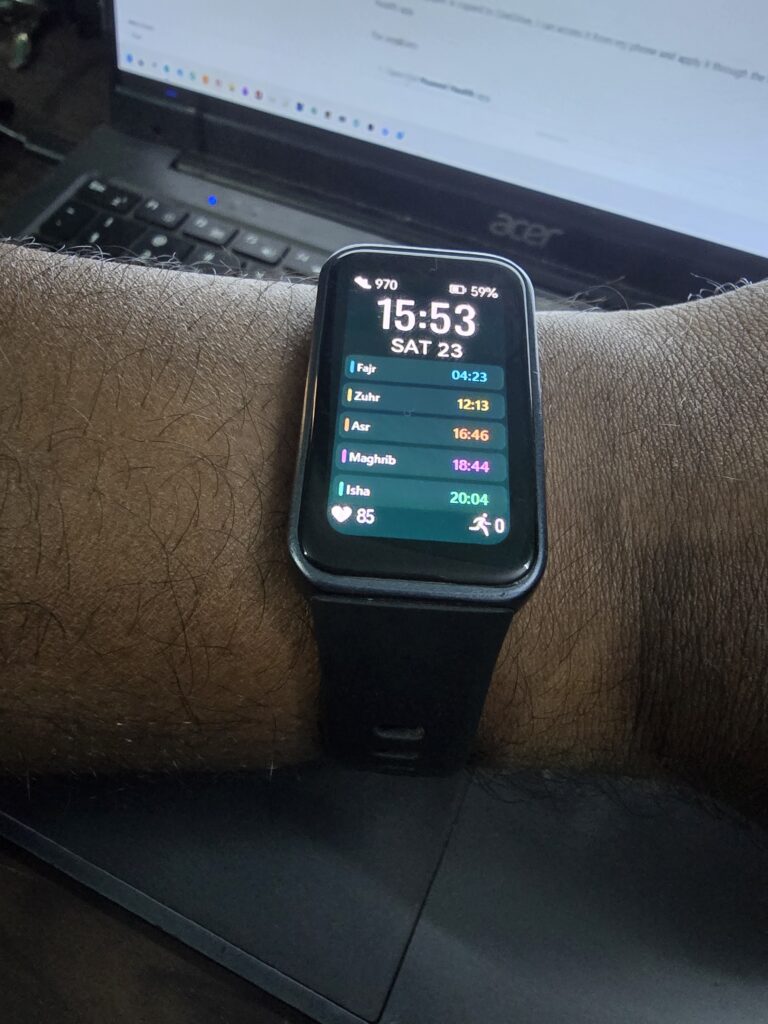
Wallpaper Preview:

What I Wanted to Build
I wanted a watch face that would show:
- Fajr
- Zuhr
- Asr
- Maghrib
- Isha
The prayer times needed to be calculated for:
- City: Hyderabad, India
- Asr method: Hanafi
- Fajr/Isha method: 18 degrees
- Device: Huawei Band 10
- Screen size: 194 x 368 pixels
I also wanted it to regenerate automatically every day so I would not have to manually calculate or edit the wallpaper.
The First Version
The first version showed the city, date, prayer times, and also highlighted the upcoming prayer. After testing it visually, I decided to make the design much cleaner.
I removed the city name, date, calculation-method text, and the “next prayer” highlight section. This gave the wallpaper a much simpler and more readable look on the small Huawei Band 10 screen.
The Final Design
The final design uses a dark AMOLED-friendly background with each prayer separated using a different color accent. I also changed “Dhuhr” to “Zuhr”, since that is the spelling I prefer.
The final displayed timings for the generated sample were:
Fajr     04:23
Zuhr     12:13
Asr      16:46
Maghrib  18:44
Isha     20:04
I also noticed that the calculated times were one minute behind my expected timings, so we added a one-minute correction to every prayer time.
How the Wallpaper Is Generated
ChatGPT/Codex helped me create a PowerShell script called:
generate-prayer-wallpaper.ps1This script does three things:
- Calculates the prayer times for Hyderabad.
- Applies Hanafi Asr calculation.
- Creates a fresh 194 x 368 PNG wallpaper for the Huawei Band 10.
The generated file is:
huawei-band-10-prayer-wallpaper.pngThe script uses Windows PowerShell and built-in drawing features, so I did not need to install extra image libraries.
Automatic Daily Update
To avoid running the script manually every day, we created a second script:
update-and-copy-prayer-wallpaper.ps1This script regenerates the wallpaper and then copies it to my OneDrive folder:
C:\Users\syeda\OneDrive\AnwaarullahIt overwrites the old wallpaper automatically, so the file always stays current.
Windows Scheduled Task
After that, we created a Windows Scheduled Task called:
Huawei Band 10 Prayer WallpaperThe task runs every day at:
00:05That means shortly after midnight, Windows automatically generates the new prayer-time wallpaper and copies it to OneDrive.
The scheduled task runs this script:
powershell.exe -NoProfile -ExecutionPolicy Bypass -File "C:\Users\syeda\Documents\Huawei Band 10\update-and-copy-prayer-wallpaper.ps1"How I Use It on Huawei Band 10
Once the wallpaper is copied to OneDrive, I can access it from my phone and apply it through the Huawei Health app.
The steps are:
- Open the Huawei Health app.
- Select the Huawei Band 10.
- Go to Watch faces.
- Open Gallery or My faces > Gallery.
- Select the generated prayer wallpaper image.
- Adjust the crop if needed.
- Set Huawei’s live time display at the top.
- Apply it as the current watch face.
Why This Approach Works
Huawei Band 10 Gallery watch faces cannot calculate prayer times directly. But by generating the image externally every day, I get almost the same result in a simple and reliable way.
The Huawei Band itself still handles the live clock display, while my generated wallpaper handles the prayer-time layout.
Can This Be Published as an Official Huawei Watch Face?
I also looked into whether this could be published officially on the Huawei Watch Face Store.
Huawei does provide a tool called Huawei Theme Studio, which can be used to create official watch faces and export them as .hwt files. However, publishing to the Huawei Watch Face Store requires a Huawei Developer account and Huawei Themes designer certification.
The bigger limitation is that Huawei Theme Studio watch faces generally support built-in data like time, date, steps, and weather, but not custom prayer-time calculation logic. So a truly automatic prayer-time watch face may not be possible as a normal Gallery or Theme Studio face unless Huawei provides special dynamic-data support.
What I Learned
This project taught me that sometimes the best solution is not a perfect official integration, but a practical workflow that works reliably every day.
With a small script, a scheduled task, and OneDrive syncing, I now have a daily updated prayer-time wallpaper for my Huawei Band 10.
It is simple, clean, readable, and personalized for my location and prayer method.
Files Used
generate-prayer-wallpaper.ps1– calculates prayer times and creates the wallpaperupdate-and-copy-prayer-wallpaper.ps1– regenerates and copies the wallpaper to OneDrivehuawei-band-10-prayer-wallpaper.png– final generated wallpaper image
Final Thoughts
This was a fun little automation project. I started with a simple idea: “Can I make my Huawei Band 10 show prayer times?”
With some help from ChatGPT/Codex, that idea turned into a working daily workflow that generates a fresh prayer-time wallpaper automatically.
It is not a full official dynamic Huawei watch face, but it does exactly what I need: a clean, personal, prayer-time display on my wrist every day.
Lovely