
My Hyundai i10 (1.2 petrol, automatic) has a Bluetooth OBD-II adapter plugged into its diagnostic port. An old moto g22 stays in the car just to run Car Scanner, the app that reads engine data through that adapter.
One day Car Scanner had saved my drive recordings but would not show them.
So with the help of Claude Code (Anthropic’s AI coding agent) on my Windows laptop, I went digging. Within two days we had a decoder for Car Scanner’s .brc files, a self-hosted dashboard at syedanwaarullah.com/carlog with health checks and a 3D i10, and a one-click sync from the phone.
This post covers what we did, the commands that mattered and the problems we hit along the way.
First, the Slow Phone
The moto g22 had become painfully slow, and touch kept failing. I asked Claude to look at it over ADB (Android Debug Bridge).
motorola moto g22 (hawaiip), Android 12
MediaTek Helio G37, 8 cores, 4 GB RAM
A quick snapshot of memory and CPU showed the problem. About 1.6 GB of RAM was free, swap was in use, and the load average was 30 on 8 cores. The phone wasn’t broken. Background apps were starving it, so Android kept pushing the app I was using out of memory, and taps seemed to miss.
I also asked about a lighter OS:
- Custom ROM: a generic Android image (GSI) could boot in theory, but nobody builds a proper ROM for this phone, and the bootloader is locked.
- Rooting: it wouldn’t make the phone noticeably faster, and unlocking the bootloader wipes the phone.
- Android One: it was a certification program, not an OS you can install.
So I stayed on stock Android and debloated. Claude disabled 21 hidden bloat packages, then I picked my own list: Photos, the Google app, Digital Wellbeing, Face Unlock, FM Radio and some preinstalled games. They were removed for my user account, which works without root:
adb shell pm uninstall --user 0 <package.name>One gotcha: inside a while read loop, adb shell swallows the rest of the list from stdin and stops after the first package. Adding < /dev/null to the adb command fixes it.
After a restart, free RAM went from about 1.6 GB to 1.86 GB and the load average from 30 to 20. Those are rough snapshots, not a benchmark, but the phone was usable again.
Car Scanner Would Not Show My Drives
With the phone cleaned up, I plugged it in again and asked Claude to get the data out.
The recordings sit in Car Scanner’s own folder under Android/data. Since Android 11, no other app can open that folder, not even a file manager. Only ADB, root or Car Scanner itself can read it.
The first pull failed with a strange path:
adb: error: failed to stat remote object 'C:/Program Files/Git/sdcard/Android/data/...'Git Bash on Windows sees a path starting with / and turns it into a Windows path. Setting MSYS_NO_PATHCONV=1 stops that:
MSYS_NO_PATHCONV=1 adb pull "/sdcard/Android/data/com.ovz.carscanner/files/records/" raw/From cmd or PowerShell, a plain adb pull is enough.
Decoding the .brc Files
The file command only said data. A hex dump showed more:
00000000: 1043 4152 5343 414e 4e45 5252 4543 4f52  .CARSCANNERRECOR
00000010: 4402 0000 0000 064d 7920 6361 7222 4879  D......My car"Hy
00000020: 756e 6461 6920 6931 3020 5041 2031 2e32  undai i10 PA 1.2
00000030: 204d 5049 2028 3230 3038 2d32 3031 3729   MPI (2008-2017)
The first byte, 0x10, is 16, the length of CARSCANNERRECORD. That is how .NET writes strings, and the rest of the file follows the same style. From there Claude worked out the layout: a header that names the car, then a list of the sensors in the recording, then thousands of small time-stamped readings.
HEADER
  "CARSCANNERRECORD", version, profile, car, adapter name, start time (.NET ticks)

RECORDS, repeated to the end of the file
  sensor definition:  id | name | short name | unit code
  sample:             seconds since start | sensor id | value
The file never says what the unit codes mean. Printing each code beside the sensor’s name and values made them easy to map: barometric pressure with code 5 and a value of 94 can only be kPa.
A word of warning: the adapter name in the header includes its Bluetooth MAC address, so check your own dumps and screenshots before sharing them.
Claude wrote the decoder, parse_brc.py, in Python. It turns every recording into two CSVs: one row per second for Excel, and every single reading with millisecond timing. Both files decoded with no bytes left unexplained.
The first look was reassuring. Coolant, charging voltage, gearbox fluid and the catalytic converter were all normal and the check-engine light was off. The only thing to watch was long-term fuel trim at +7.8%. That is how much extra fuel the engine computer has learned to add. It’s within the normal ±10%, but a steady positive number can mean a small air leak.
A Dashboard on My Own Site
I wanted to keep every drive and see them on my own website, which runs WordPress on Hostinger shared hosting. The dashboard got its own /carlog/ folder with a small PHP API that stores the drives.
I didn’t want anything running locally, so Claude prepared the files and I uploaded them through Hostinger’s File Manager. Later I asked for it to be public to read, with only me able to push data. Uploading or deleting needs a key that exists only on my laptop and the server.
Two problems along the way are worth knowing about:
- Extracting a zip over the folder replaced it. I extracted a two-file update zip, and the API and the stored drives were gone. A complete zip rebuilt it, the drives were pushed again from the laptop, and now I upload single files only.
- LiteSpeed Cache cached the 404s. While the API was missing, WordPress’s cache plugin saved the “not found” page for those addresses and kept serving it. Every API request now carries a unique value, so it never matches a cached copy.
One-Click Sync
I wanted something that works without Claude. I plug in the phone, click once, and the drives are on the website.
push_to_site.py does the work:
- Copies only new recordings from the phone over ADB and checks their size.
- Decodes them and refreshes the CSVs.
- Asks the site which drives it already has and uploads only the missing ones.
- Uploads my settings and the newest Fuelio export (more on that below).
A small PowerShell window called CarLog Sync wraps it, with a desktop shortcut. It ends in a green “Done”, an amber note or a red “Sync failed”.
Double-clicking a .ps1 file opens it in Notepad++ instead of running it. Windows does that on purpose, so we left that setting alone and added a three-line CarLog Sync.cmd launcher instead.
The sync reads Car Scanner’s folder on whichever phone is plugged in, so it also worked with my Samsung S24 Ultra after switching on USB debugging. Its older recordings joined the site too, and there are 12 drives on it now.
What the Dashboard Shows
Then I asked for car health, proactive alerts and a much more complete dashboard, plus a 3D i10 that looks good and is actually useful.
It now has seven tabs: Overview, Drive report, 3D car, Fuel & cost, Maintenance, Compare and Trends. It works on a phone screen too.
The health checks are plain rules: battery with the engine off, charging voltage, coolant, fuel trims, warm idle, gearbox fluid and more. Each one compares the reading with the normal range and with the car’s own history. The latest drive, with 12 sensors and about 54,000 readings, came back with “Healthy. Nothing on this drive needs attention.”
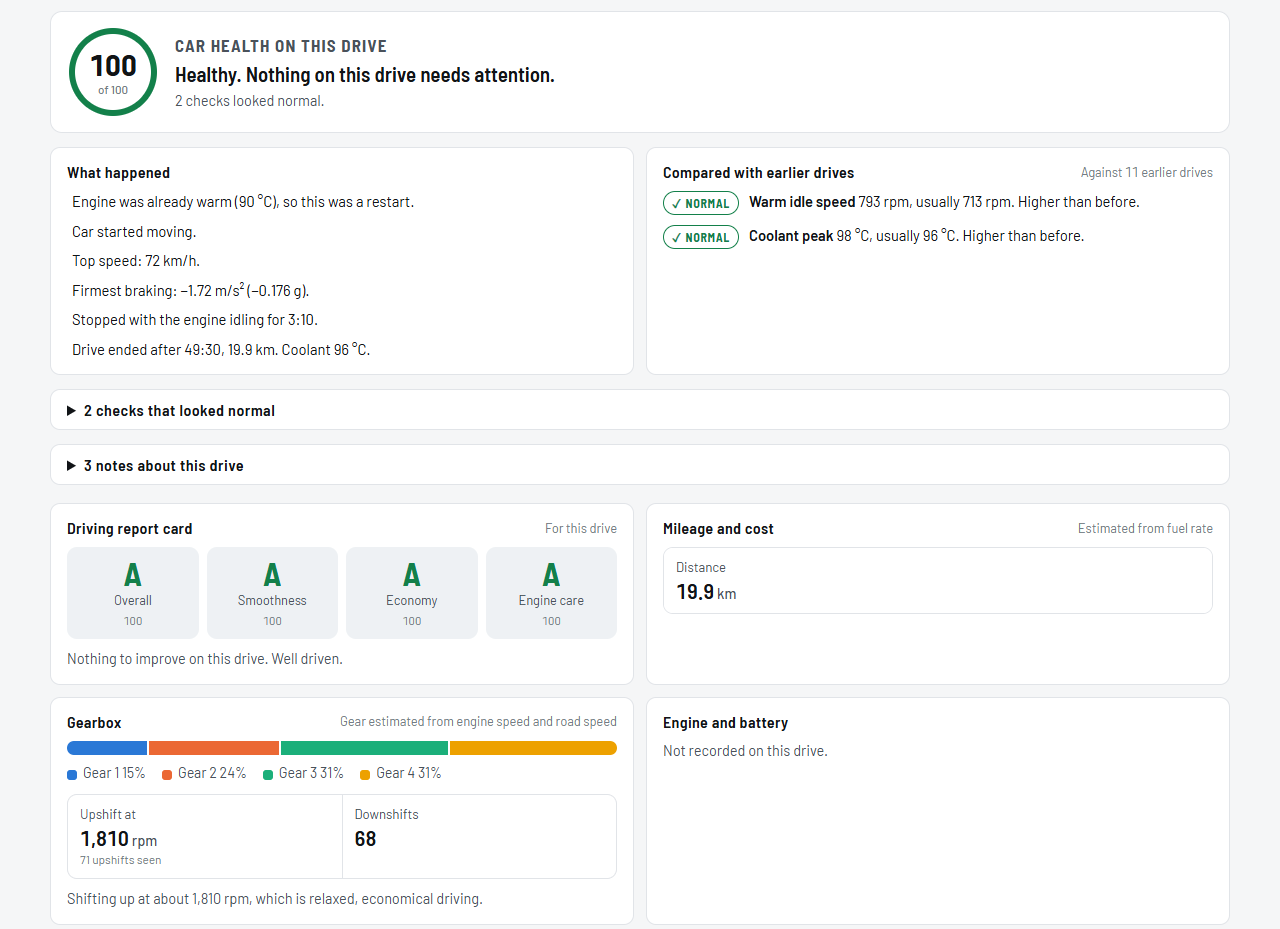
Across all drives, two things are flagged. Long-term fuel trim holds steady around +7 to +8%. Battery voltage with the engine off has dropped from about 12.3 V to 11.7 V, which is a hint to get the battery tested.
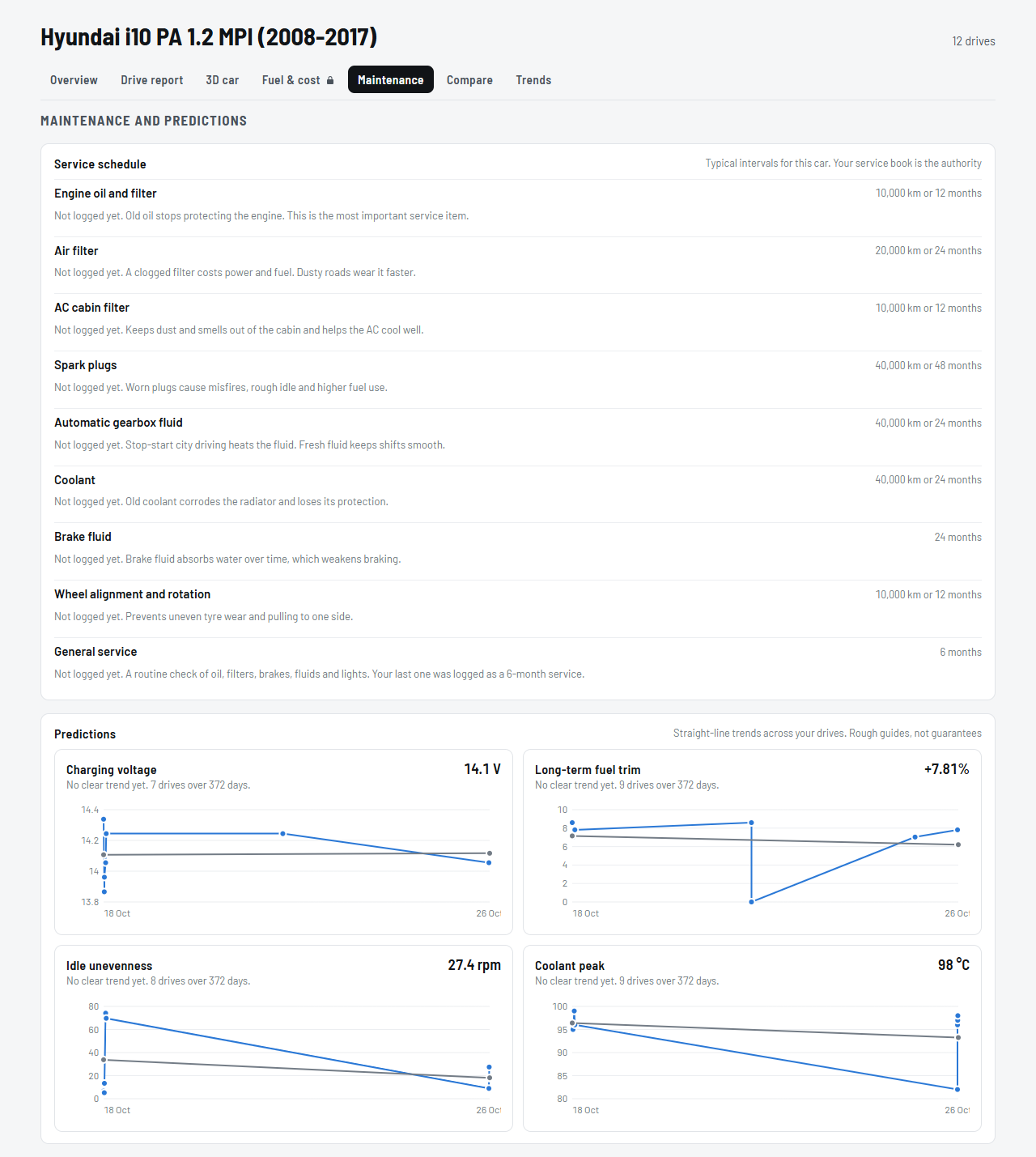
Each drive also gets a report card for smoothness, economy and engine care. Predictions draw straight-line trends across drives, and the page labels them “rough guides, not guarantees”. The Maintenance tab reads the engine computer’s own distance counter. That counter keeps going on drives I didn’t record, so it shows far more kilometres than Car Scanner ever captured.
Measuring the Gear Ratios
Car Scanner doesn’t report the gear, so the dashboard estimates it from engine rpm per km/h. Claude started with typical ratios for the 4-speed automatic, then measured mine from real drives:
gear   assumed   measured   (rpm per km/h)
1st    121.6     ~135
2nd     64.6     ~71
3rd     41.7      42.5
4th     29.7      29.6
First and second were well off, partly because the automatic’s torque converter slips at low speed. The measured values went into the code.
The 3D i10
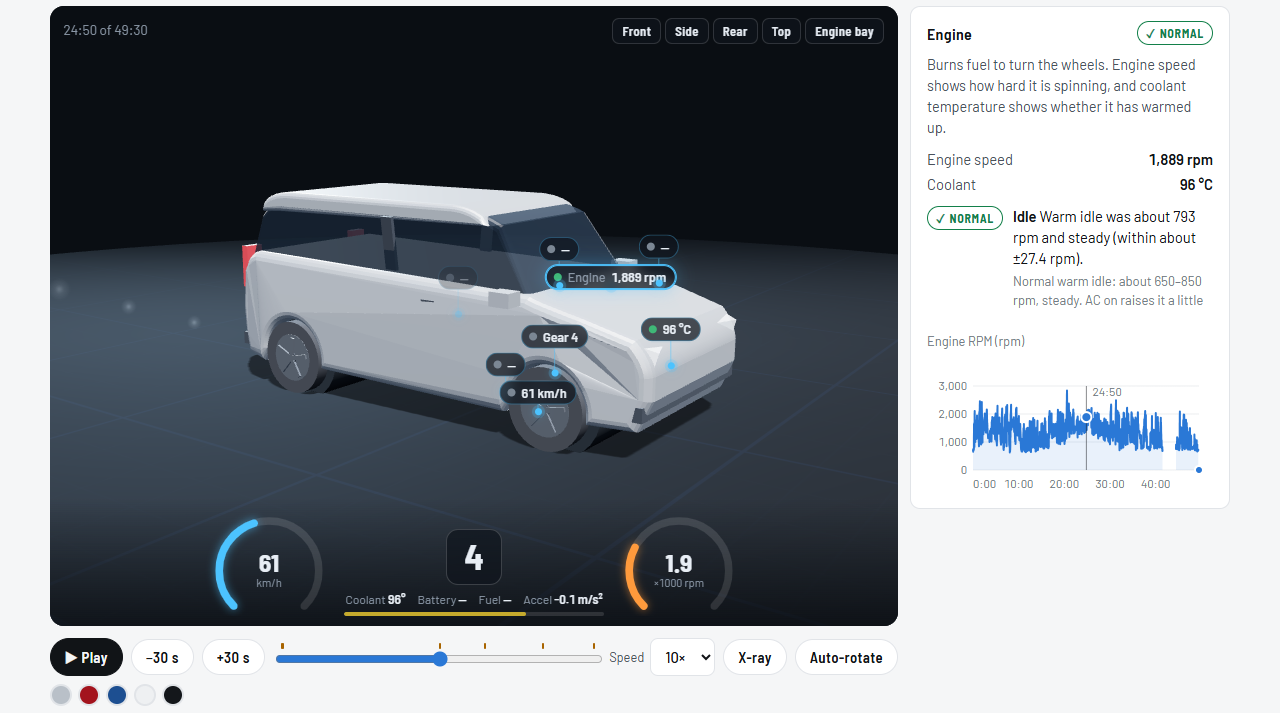
Good i10 3D models are commercial, so the car is an i10-shaped model built in code with Three.js. Each part has a floating label with its live value. There’s an X-ray mode, camera presets for front, side, rear, top and the engine bay, and drive playback at up to 60x with event marks on the timeline. The wheels turn with speed and the body dips under braking.
Fuelio, Then a Password
I log every fill-up and service in the Fuelio app. The sync now uploads its CSV export too, and the Fuel & cost tab works out real mileage from full tank to full tank, spend by month, the price trend, running cost per km and a service log.
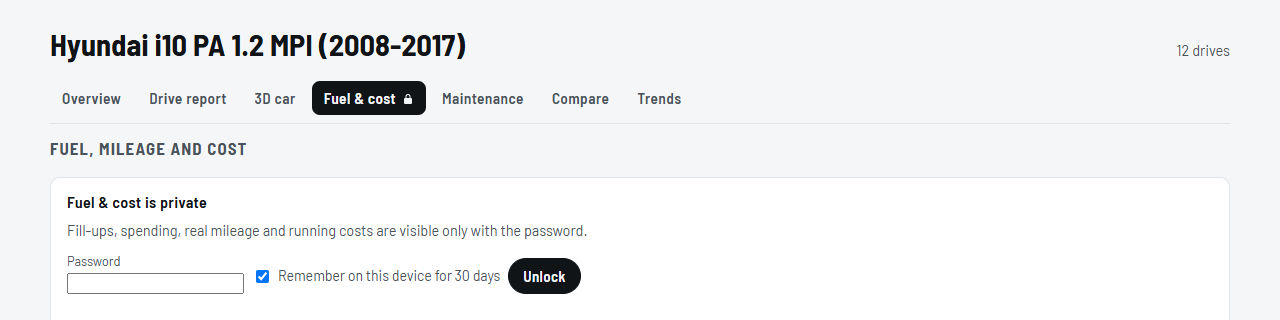
That is personal data, and the whole site was public. Hiding the tab in the page wouldn’t be enough, because anyone could still read the data straight from the server. So now:
- The server doesn’t send Fuelio data to the public at all.
- The password is checked on the server and stored only as a salted hash.
- Wrong guesses are slowed down.
- A correct password keeps the browser signed in for 30 days, and a Lock button signs it out.
How It Was Checked
Before the big dashboard ever ran in a browser, Claude had a team of review agents go through the code, with a second agent trying to disprove each finding. They confirmed 44 problems, including one that would have left the page stuck on “Loading your drives” forever. A second pass found 8 more. Testing on the live site then caught a few layout issues, like overlapping 3D labels, and those were fixed too.

For updates, Claude can push the dashboard’s HTML, CSS and JavaScript with a separate key, and the server backs up every file it replaces. PHP and config files I still upload by hand, because PHP runs with access to the whole hosting account.
What I Learned
- If an Android app saves data it won’t show, check
Android/data. Without root, ADB is the way in. - With an unknown binary format, look for readable strings in the header and patterns that repeat, then count the bytes your decoder can’t explain.
- Measure from your own data. The typical gear ratios were wrong for first and second.
- Hiding something in the page is not privacy. The server must not send the data.
Files Used
- parse_brc.py – decodes
.brcrecordings into CSV - push_to_site.py – copies new recordings over ADB, decodes them and uploads them
- CarLog Sync.ps1 and CarLog Sync.cmd – the sync window and its launcher
- fuelio_import.py – reads the Fuelio CSV export
- deploy_site.py – pushes dashboard updates
Final Thoughts
This started with a slow phone and an app that wouldn’t show its own recordings. The data was on the phone the whole time, in a folder only ADB could reach and a format nobody documents.
Car Scanner records no GPS, so there are no maps or routes, and the engine-based fuel figures are estimates. It isn’t a commercial OBD product, but it does exactly what I need: plug the phone in after a drive, double-click once, and the drive is on my site with a health check.